SentientOne AIdocs
Back to Platform
API Documentation

SentientOne AI Chat API

Send a single POST request with your platform API key, agent ID header, and message — get an AI-powered response from a pre-configured agent. No LLM setup needed in your code. Agents are created and managed through the SentientOne AI platform.

POST/api/chat/public
X-Api-Key:sk-so-your_platform_key
X-Agent-Id:your-agent-uuid

Overview

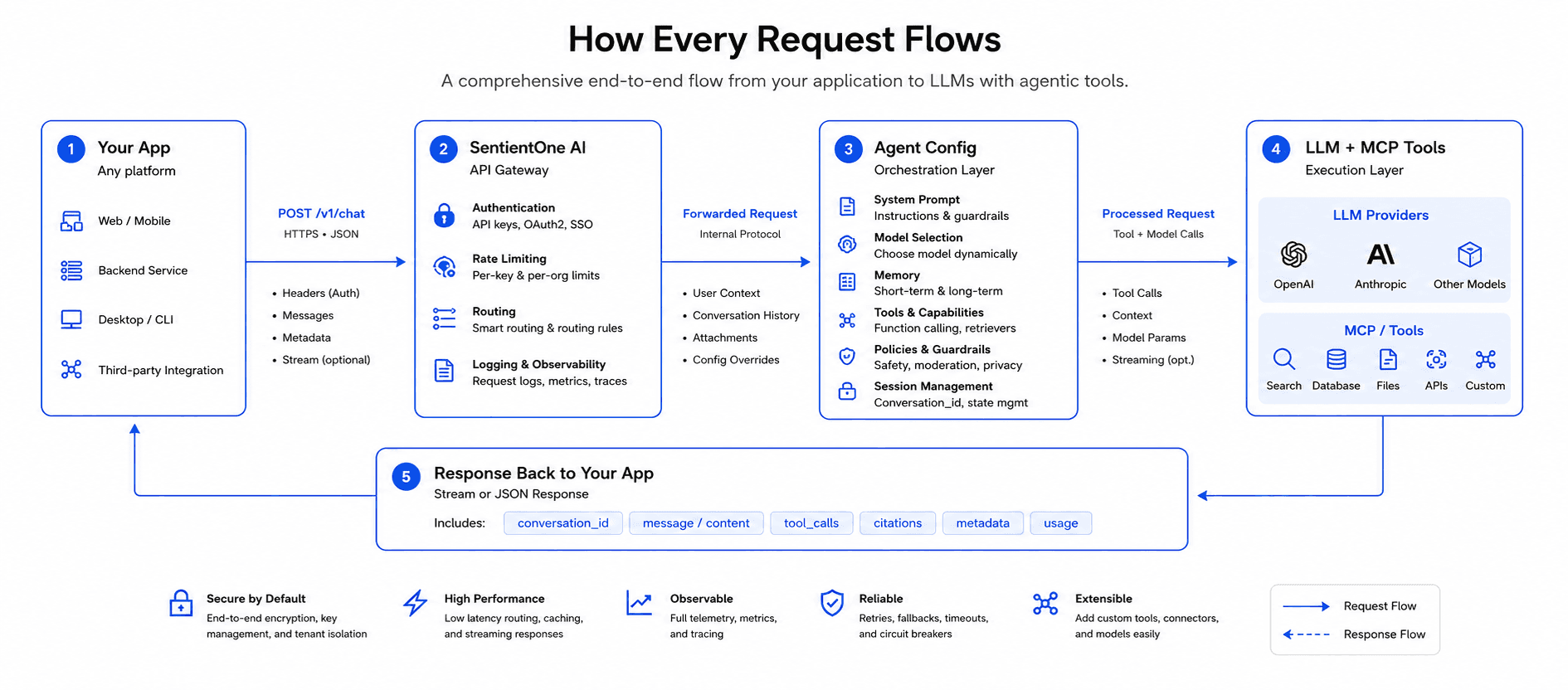
SentientOne AI is an agent orchestration platform. Instead of hardcoding LLM calls in your application, you configure agents through the SentientOne platform — each with its own provider, model, system prompt, and parameters. Your application then calls a single POST endpoint with two headers (your API key and the agent ID) plus a message body, and gets an AI response back.

Configure Agents

Create specialized agents in the platform UI with system prompts, model selection, and MCP tool definitions.

One Endpoint

Call POST /api/chat/public with X-Api-Key and X-Agent-Id headers from any language or platform.

Streaming Support

Get responses as standard JSON or real-time Server-Sent Events (SSE) for token-by-token streaming.

How It Works

1

Create an Agent in the SentientOne Platform

Log into SentientOne AI and create an agent. Configure its system prompt, choose the LLM provider (OpenAI/Anthropic), model, temperature, and provide the provider API key. Connect MCP servers so the agent can call your tools. Each agent gets a unique Agent ID — copy it from the Agents page.

2

Get Your Platform API Key

Your SentientOne platform key (sk-so-…) is found in Settings. Send it in every request as the X-Api-Key header. This is separate from the LLM provider key — the platform key authenticates your application, while each agent's LLM key is stored server-side and never exposed.

3

Call POST /api/chat/public from Your App

From any HTTP client — send a POST request with X-Api-Key (your platform key) and X-Agent-Id (the agent UUID) headers, plus a JSON body containing message. The platform loads the agent config, injects the system prompt, runs any MCP tool calls, manages conversation history, and returns the full response.

Architecture

┌─────────────────┐   POST /api/chat/public    ┌─────────────────────┐
│                 │   X-Api-Key: sk-so-...   │                     │
│  Your App       │   X-Agent-Id: uuid...    │  SentientOne AI      │
│  (Any platform) │ ───────────────────────▶│  Platform            │
│                 │   { message }           │                     │
│                 │ ◄───────────────────────│                     │
└─────────────────┘   { conversation_id,      └──────────┼──────────┘
                            message, tool_calls? }          │
                                                  ┌─────────▼────────┐
                                                  │   Agent Config    │
                                                  │  system_prompt    │
                                                  │  provider/model   │
                                                  │  llm_api_key      │
                                                  │  temperature      │
                                                  │  MCP tools        │
                                                  └─────────┼────────┘
                                                            │
                                                  ┌─────────▼────────┐
                                                  │  LLM + MCP Tools  │
                                                  │ OpenAI/Anthropic  │
                                                  └──────────────────┘

Why Configure Agents?

Agents are the core abstraction that makes SentientOne AI powerful. Instead of embedding LLM configuration in your application code, you define specialized agents — each tailored for a specific task. Here's why this matters:

1. Separation of Concerns

Your application code stays clean — just a POST call. All LLM-specific logic (system prompt, model choice, temperature, API keys) lives in the agent configuration. Change the model from GPT-4o to Claude without modifying a single line of application code.

2. Task-Specific Specialization

Each agent has a focused system prompt. An "Order Agent" knows how to query order details via MCP tools. A "Product Agent" understands product catalogs. A "Support Agent" handles customer inquiries. The system prompt constrains the LLM to excel at one specific domain.

3. MCP Integration Ready

If your company exposes APIs through MCP (Model Context Protocol), you configure agents whose system prompts instruct the LLM to use those MCP tools. The agent becomes the bridge between your MCP server and any application that needs AI-powered access to your data.

4. Per-Agent API Keys & Models

Each agent carries its own LLM API key and model configuration. Use GPT-4o for complex reasoning tasks and Claude Haiku for fast classification. Different departments can use different keys for cost tracking.

5. Zero LLM Code in Your App

No OpenAI SDK, no prompt engineering, no token management in your codebase. Your app sends a message and gets a response — the platform handles everything else. This means faster development, easier testing, and no vendor lock-in at the application layer.

Authentication

All API requests require two headers: your platform API key and the agent ID. The platform key authenticates your application; the agent ID selects which configured agent handles the request.

Required Headers

X-Api-Keystringrequired

Your SentientOne platform API key (sk-so-…). Find this in Settings → API Key. Authenticates your application with the platform.

X-Agent-Idstringrequired

The UUID of the agent to invoke. Copy this from the Agents page — it's shown prominently below the agent name.

Content-Typestringrequired

Must be application/json.

curl -X POST https://your-domain.com/api/chat/public \
  -H "Content-Type: application/json" \
  -H "X-Api-Key: sk-so-your_api_key_here" \
  -H "X-Agent-Id: a1b2c3d4-e5f6-7890-abcd-ef1234567890" \
  -d '{ "message": "Hello!" }'

Keep your API key secure

Never expose your API key in client-side code, public repositories, or browser network requests. Call the SentientOne API from your backend server and proxy responses to your frontend.

Header Reference

HeaderExample ValueWhere to find it
X-Api-Keysk-so-abc123…Settings → API Key
X-Agent-Ida1b2c3d4-…Agents page → Agent ID chip
Content-Typeapplication/jsonAlways required

Chat API

The primary endpoint for all agent interactions

This is the only endpoint your application needs to call. Send a message to any configured agent and receive an AI-powered response. The platform handles system prompt injection, conversation history, LLM routing, and response storage.

POST /api/chat/public — Standard Response

Send a message and receive the complete AI response in a single JSON payload. Agent ID is passed as a header — no agent_id in the body.

curl -X POST https://your-domain.com/api/chat/public \
  -H "Content-Type: application/json" \
  -H "X-Api-Key: sk-so-your_api_key_here" \
  -H "X-Agent-Id: a1b2c3d4-e5f6-7890-abcd-ef1234567890" \
  -d '{
    "message": "Get the order details for OrderId: ORD-1234 and UserId: USR-5678"
  }'

Request Headers

X-Api-Keystringrequired

Your SentientOne platform API key (sk-so-…). From Settings → API Key.

X-Agent-Idstringrequired

The UUID of the agent to invoke. From Agents page → Agent ID.

Content-Typestringrequired

Must be application/json.

Request Body

messagestringrequired

The user's message or prompt. Appended to the conversation history and sent to the LLM along with the agent's system prompt.

conversation_idstring

Optional. Pass an existing conversation ID to continue a multi-turn conversation with full history context. If omitted, a new conversation is created automatically.

Response (200 OK):

{
  "conversation_id": "conv-uuid-...",
  "message": {
    "id": "msg-uuid-...",
    "conversation_id": "conv-uuid-...",
    "role": "assistant",
    "content": "The order ORD-1234 is currently shipped via FedEx (tracking FX-998877)...",
    "token_count": 156,
    "created_at": "2025-03-04T14:30:00Z"
  },
  "tool_calls": [
    {
      "name": "get_order",
      "input": { "order_id": "ORD-1234", "user_id": "USR-5678" },
      "output": "{\"status\":\"shipped\",\"carrier\":\"FedEx\",...}"
    }
  ]
}

Response Fields

conversation_idstring

The conversation this message belongs to. Store this to continue the conversation in follow-up requests.

message.idstring

Unique ID of the saved assistant message.

message.rolestring

Always "assistant" for responses.

message.contentstring

The AI response text. Format depends on the agent's output_type (text, json, markdown, or code).

message.token_countnumber

Total tokens used across all LLM calls in this request (including tool-use rounds).

tool_callsarray

Only present if the agent executed MCP tools. Each entry has name, input, and output.

What happens when you call this endpoint

  1. X-Api-Key is validated — resolves to your account.
  2. The agent is loaded via X-Agent-Id — its system prompt, model, provider, LLM API key, and parameters.
  3. If no conversation_id is provided in the body, a new conversation is created.
  4. Your message is saved to the conversation history.
  5. The full history (system prompt + all prior messages + new message) is sent to the LLM.
  6. If the LLM requests MCP tool calls, they are executed and results fed back (up to 8 rounds).
  7. The final response is saved to the conversation and returned with an optional tool_calls array.

Streamable HTTP

For real-time token-by-token responses, use the Streamable HTTP endpoint. Send the same headers as the standard endpoint and include Accept: text/event-stream — the server responds with a Server-Sent Events stream. Ideal for chat UIs that want to display text as it generates, or for monitoring MCP tool execution in real time.

POST/api/chat/public/streamReturns text/event-stream
curl -N -X POST https://your-domain.com/api/chat/public/stream \
  -H "Content-Type: application/json" \
  -H "Accept: text/event-stream" \
  -H "X-Api-Key: sk-so-your_api_key_here" \
  -H "X-Agent-Id: a1b2c3d4-e5f6-7890-abcd-ef1234567890" \
  -d '{ "message": "Get the order details for OrderId: ORD-1234" }'

Event stream format:

data: {"type":"meta","conversation_id":"conv-uuid-..."}

data: {"type":"tool_call","id":"tc-1","name":"get_order","input":{"order_id":"ORD-1234"}}
data: {"type":"tool_result","id":"tc-1","name":"get_order","output":"{\"status\":\"shipped\"}"}

data: {"type":"delta","content":"The order ORD-1234 is"}
data: {"type":"delta","content":" currently shipped via FedEx"}
...
data: {"type":"done","message":{"id":"msg-uuid","role":"assistant","content":"...","token_count":156}}

Event Types

metaevent

First event. Contains conversation_id for this session. Store it for multi-turn follow-ups.

tool_callevent

Emitted when the LLM decides to call an MCP tool. Contains id, name, and input.

tool_resultevent

Emitted after the tool executes. Contains id, name, and output. Matches the preceding tool_call by id.

deltaevent

Streamed text chunk. Concatenate all content values to build the full response.

doneevent

Final event. Contains the complete saved message object including token_count.

errorevent

Emitted on failure. Contains an error string describing the problem.

JavaScript — reading the stream

const res = await fetch("https://your-domain.com/api/chat/public/stream", {
  method: "POST",
  headers: {
    "Content-Type": "application/json",
    "Accept": "text/event-stream",
    "X-Api-Key": "sk-so-your_api_key_here",
    "X-Agent-Id": "a1b2c3d4-e5f6-7890-abcd-ef1234567890",
  },
  body: JSON.stringify({ message: "Get the order details for OrderId: ORD-1234" }),
});

const reader = res.body.getReader();
const decoder = new TextDecoder();
let buffer = "";
let fullContent = "";

while (true) {
  const { value, done } = await reader.read();
  if (done) break;
  buffer += decoder.decode(value, { stream: true });
  const lines = buffer.split("\n");
  buffer = lines.pop() ?? "";
  for (const line of lines) {
    if (!line.startsWith("data: ")) continue;
    const event = JSON.parse(line.slice(6));
    if (event.type === "meta") console.log("conversation:", event.conversation_id);
    if (event.type === "tool_call") console.log("Calling tool:", event.name, event.input);
    if (event.type === "tool_result") console.log("Tool result:", event.output);
    if (event.type === "delta") { fullContent += event.content; process.stdout.write(event.content); }
    if (event.type === "done") console.log("\nTokens used:", event.message.token_count);
  }
}

Multi-Turn Conversations

The platform maintains full conversation history. To continue a conversation, pass the conversation_id from a previous response.

# First message — starts a new conversation
curl -X POST https://your-domain.com/api/chat/public \
  -H "Content-Type: application/json" \
  -H "X-Api-Key: sk-so-your_api_key_here" \
  -H "X-Agent-Id: ORDER_AGENT_UUID" \
  -d '{ "message": "Look up order ORD-1234 for user USR-5678" }'
# Response: { "conversation_id": "conv-abc-123", "message": { ... } }

# Follow-up — continues the same conversation with full context
curl -X POST https://your-domain.com/api/chat/public \
  -H "Content-Type: application/json" \
  -H "X-Api-Key: sk-so-your_api_key_here" \
  -H "X-Agent-Id: ORDER_AGENT_UUID" \
  -d '{ "message": "What is the delivery ETA for that order?", "conversation_id": "conv-abc-123" }'

The agent sees the full conversation history, so it knows "that order" refers to ORD-1234 without you needing to repeat it. This enables natural, contextual follow-up queries.

Error Handling

All errors return a JSON body with an error field and an appropriate HTTP status code.

{
  "error": "agent_id and message are required"
}
StatusDescription
400Missing message in body, or missing X-Agent-Id header.
401Invalid or missing X-Api-Key header.
404Agent not found or inactive.
500Internal server error or LLM provider failure.

Retry Strategy

For 500 errors, implement exponential backoff with 3 retries. LLM providers may experience transient failures. For 400/401/404 errors, do not retry — fix the request.

Observability

Every agent interaction is automatically captured by SentientOne. You get full visibility into requests, responses, token usage, latency, and cost — across every conversation, every agent, every day. These are insights that would take significant engineering effort to implement independently in each application your organisation runs.

Zero instrumentation required

You don't add logging libraries, configure tracing sidecars, or write cost-calculation middleware. Every call to /api/chat/public is recorded automatically — your application code stays clean.

Full Request / Response Logs

Every message sent to an agent and every response it generates is stored and viewable in the platform. Inspect the exact prompt history, system prompt injections, and LLM output for any conversation — invaluable for debugging unexpected agent behaviour.

Token Usage per Conversation

Prompt tokens, completion tokens, and total tokens are tracked per request and aggregated per agent. Spot which agents or conversation flows are consuming the most tokens and optimise system prompts accordingly.

Response Time Tracking

End-to-end latency is recorded for every request — including time spent in MCP tool calls. Identify slow agents, slow tools, or LLM provider latency spikes without instrumenting a single line of your own code.

Cost per Conversation

Based on the token counts and the cost-per-1k-tokens configured for each agent, the platform calculates the exact LLM cost for every request. Roll up by agent, by day, or across your whole organisation to track AI spend precisely.

What is captured per request

FieldDescription
request_messagesFull conversation history sent to the LLM (up to 50 messages)
response_contentComplete LLM response text
prompt_tokensTokens consumed by the input / prompt
completion_tokensTokens consumed by the generated response
total_tokensSum across all LLM rounds including tool-use iterations
costCalculated LLM cost in USD based on agent's cost_per_1k_tokens
provider / modelLLM provider and model name used for this request
statussuccess or error with error message if applicable

Why this matters at scale

1

One place, all agents. A typical organisation running 5–20 agents across multiple teams would need separate logging, monitoring, and cost-tracking implementations per app. SentientOne centralises all of this automatically.

2

Audit and compliance. Every LLM interaction is logged with timestamps, user IDs, and conversation IDs — ready for compliance reviews, security audits, or dispute resolution.

3

Cost control. Know exactly which agents, users, or workflows are driving AI spend before your LLM bill arrives. Set up alerts or impose limits at the agent level.

4

Prompt engineering feedback loop. Compare token counts and response quality across system prompt iterations to find the most efficient and accurate configuration for each agent.

Security

Security isn't an afterthought — it's built into every layer of the SentientOne AI platform. From how we handle your API keys to how data flows between services, we follow industry-leading standards to keep your information protected.

Encryption at Rest & In Transit

All data is encrypted using AES-256 at rest and TLS 1.3 in transit. API keys, LLM provider credentials, and conversation data are never stored in plaintext.

API Key Authentication

Every request is authenticated via scoped API keys. Keys are hashed before storage, rate-limited per key, and can be rotated or revoked instantly from the dashboard.

Data Isolation

Each organization's agents, conversations, and credentials are fully isolated. Row-level security policies ensure no cross-tenant data access, even at the database layer.

Audit Logging

Every API call, agent configuration change, and authentication event is logged with timestamps and user context. Full audit trails for compliance and forensics.

Compliance & Standards

SOC 2

Type II

GDPR

Compliant

ISO 27001

Certified

OWASP

Top 10 Covered

LLM Provider Key Security

Your OpenAI, Anthropic, or other provider API keys are encrypted with per-organization encryption keys and stored in a dedicated secrets vault. They are only decrypted server-side at the moment of an LLM call and are never exposed in API responses — the platform returns masked values (e.g. ••••••••sk-4f2a).

No Data Training

Your conversations and agent prompts are never used to train any models. Data flows through the platform to the LLM provider and back — we don't retain, analyze, or share your content beyond what's needed to deliver the service.

Role-Based Access Control

Admins manage agents and API keys. Users interact through the chat interface. API consumers are scoped to specific agents. Each role has precisely the permissions it needs — nothing more.

Hosting & Deployment

Your data, your rules. SentientOne AI runs wherever your security and compliance requirements demand — in the cloud, on your own servers, or a hybrid of both. You choose where your data lives.

Cloud Hosted

Fastest way to get started

  • Fully managed by SentientOne — zero infrastructure to maintain
  • Auto-scaling to handle traffic spikes without config changes
  • Global CDN with edge routing for low-latency API calls
  • Automatic updates, patches, and security fixes
  • 99.9% uptime SLA with multi-region failover

On-Premise

Maximum control & compliance

  • Deploy on your own servers, VPC, or private cloud
  • Data never leaves your network — full sovereignty
  • Integrate with your existing SSO, LDAP, and IAM policies
  • Air-gapped deployment option for regulated industries
  • Custom retention policies and data residency controls

Hybrid Deployment

Need the best of both worlds? Run the agent orchestration layer in the cloud for simplicity while keeping sensitive data processing on-premise. Or use cloud for development and staging, with on-premise for production.

┌─────────────────────────────────────────────────────┐
│                  Your Infrastructure                 │
│                                                     │
│   ┌──────────────┐         ┌──────────────────┐     │
│   │ Your Apps    │────────▶│  Infonex AI      │     │
│   └──────────────┘         │  (On-Premise)    │     │
│                            │                  │     │
│                            │  Agents, Keys,   │     │
│                            │  Conversations   │     │
│                            └────────┬─────────┘     │
│                                     │               │
│                            ┌────────▼─────────┐     │
│                            │  Your Database   │     │
│                            │  (Full Control)  │     │
│                            └──────────────────┘     │
│                                     │               │
└─────────────────────────────────────┼───────────────┘
                                      │ Encrypted
                            ┌─────────▼──────────┐
                            │   LLM Provider     │
                            │  (OpenAI/Anthropic) │
                            └────────────────────┘

Data Residency

Choose where your data is stored — US, EU, APAC, or your own data center. Meet regional compliance requirements without compromising performance.

Zero-Downtime Updates

Platform updates are rolled out with blue-green deployments. No maintenance windows, no service interruptions. On-premise customers control their own update schedule.

Disaster Recovery

Automated backups, point-in-time recovery, and cross-region replication. Your agent configurations and conversation history are always recoverable.

Real-World Use Cases

Example 1: Order Management Agent

A company has an MCP server that exposes order management tools. They create an agent in the Infonex platform that instructs the LLM to use those tools to fetch order details, delivery status, and product information.

Step 1 — Create the agent in the SentientOne platform UI:

NameOrder Agent
ProviderOpenAI
Modelgpt-4o
Temperature0.2
Output TypeJSON
System Prompt"You are an Order Management Assistant connected to the company MCP server. You have access to: get_order(order_id, user_id), get_delivery_status(order_id), get_order_products(order_id). When asked about an order, extract the OrderId and UserId, call the appropriate tools, and return a JSON summary with status, items, prices, delivery estimate, and tracking number."

Step 2 — Call the agent from your application:

# From your e-commerce backend, customer portal, or mobile app
curl -X POST https://your-domain.com/api/chat/public \
  -H "Content-Type: application/json" \
  -H "X-Api-Key: sk-so-your_api_key_here" \
  -H "X-Agent-Id: ORDER_AGENT_UUID" \
  -d '{ "message": "Get full order details including delivery and products for OrderId: ORD-78923 and UserId: USR-4412" }'

Step 3 — Receive structured response:

{
  "conversation_id": "conv-...",
  "message": {
    "role": "assistant",
    "content": "{\n  \"order_id\": \"ORD-78923\",\n  \"status\": \"shipped\",\n  \"customer\": \"USR-4412\",\n  \"items\": [\n    { \"name\": \"Wireless Headphones\", \"qty\": 1, \"price\": 89.99 },\n    { \"name\": \"USB-C Cable\", \"qty\": 2, \"price\": 12.99 }\n  ],\n  \"total\": 115.97,\n  \"delivery\": {\n    \"carrier\": \"FedEx\",\n    \"tracking\": \"FX-998877\",\n    \"estimated_delivery\": \"2025-03-07\",\n    \"status\": \"in_transit\"\n  }\n}",
    "token_count": 198
  }
}

Example 2: Product Lookup Agent

A separate agent focused purely on product catalog queries — using Anthropic's Claude with different MCP tools and a different system prompt.

NameProduct Agent
ProviderAnthropic
Modelclaude-sonnet-4-20250514
Output TypeText
System Prompt"You are a Product Catalog Assistant. You have access to: search_products(query, category?, limit?), get_product(product_id), get_recommendations(product_id, limit?). Return comprehensive details including name, price, availability, key specs, and related products."

Call the product agent:

curl -X POST https://your-domain.com/api/chat/public \
  -H "Content-Type: application/json" \
  -H "X-Api-Key: sk-so-your_api_key_here" \
  -H "X-Agent-Id: PRODUCT_AGENT_UUID" \
  -d '{ "message": "Show me the details for product PRD-2210 and suggest similar items" }'

Integration Pattern

Here's the recommended pattern for companies integrating Infonex AI into their stack:

┌──────────────────────────────────────────────────────────────────┐
│                        Your Company                              │
│                                                                  │
│  ┌─────────────┐  ┌─────────────┐  ┌─────────────┐              │
│  │  Web App    │  │  Mobile App │  │  Internal   │              │
│  │  (React)    │  │  (Flutter)  │  │  Tools      │              │
│  └──────┬──────┘  └──────┬──────┘  └──────┬──────┘              │
│         │                │                │                      │
│         └────────────────┼────────────────┘                      │
│                          │                                       │
│             POST /api/chat/public                                 │
│              │              │              │  X-Api-Key + X-Agent-Id │
│                          { message }                             │
│              ┌───────────▼────────────┐                          │
│              │   Infonex AI Platform   │                          │
│              │                        │                          │
│              │  ┌──────────────────┐  │                          │
│              │  │  Order Agent     │──┼──▶ MCP: get_order()      │
│              │  │  (GPT-4o, JSON)  │  │                          │
│              │  ├──────────────────┤  │                          │
│              │  │  Product Agent   │──┼──▶ MCP: search_products()│
│              │  │  (Claude, Text)  │  │                          │
│              │  ├──────────────────┤  │                          │
│              │  │  Support Agent   │──┼──▶ MCP: get_tickets()    │
│              │  │  (GPT-4o, MD)    │  │                          │
│              │  └──────────────────┘  │                          │
│              └────────────────────────┘                          │
│                                                                  │
│              ┌────────────────────────┐                          │
│              │   Your MCP Server      │                          │
│              │   (REST / gRPC APIs)   │                          │
│              └────────────────────────┘                          │
└──────────────────────────────────────────────────────────────────┘

Quick Start Summary

  1. Create agents — In the SentientOne platform, configure agents with system prompts, models, and LLM keys for each use case.
  2. Copy your API key — From Settings → API Key (sk-so-…).
  3. Copy your Agent ID — From Agents page → Agent ID chip.
  4. Call from your appPOST /api/chat/public with X-Api-Key and X-Agent-Id headers, body {"message": "…"}.
  5. Parse the responsemessage.content contains the AI response; tool_calls (if present) shows any MCP tool executions.

Code Examples

Python

import requests

BASE_URL = "https://your-domain.com"
API_KEY = "sk-so-your_api_key_here"
AGENT_ID = "a1b2c3d4-e5f6-7890-abcd-ef1234567890"  # from Agents page

headers = {
    "Content-Type": "application/json",
    "X-Api-Key": API_KEY,
    "X-Agent-Id": AGENT_ID,
}

# Single message
response = requests.post(f"{BASE_URL}/api/chat/public", headers=headers, json={
    "message": "Get order details for OrderId: ORD-1234, UserId: USR-5678"
})

data = response.json()
print(data["message"]["content"])

# Check if any MCP tools were called
if data.get("tool_calls"):
    for tc in data["tool_calls"]:
        print(f"Tool: {tc['name']}, Input: {tc['input']}")

# Follow-up in same conversation
response2 = requests.post(f"{BASE_URL}/api/chat/public", headers=headers, json={
    "message": "What is the delivery ETA?",
    "conversation_id": data["conversation_id"],
})
print(response2.json()["message"]["content"])

JavaScript / TypeScript

const API_KEY = "sk-so-your_api_key_here";
const AGENT_ID = "a1b2c3d4-e5f6-7890-abcd-ef1234567890"; // from Agents page
const BASE_URL = "https://your-domain.com";

const headers = {
  "Content-Type": "application/json",
  "X-Api-Key": API_KEY,
  "X-Agent-Id": AGENT_ID,
};

// Single request
const res = await fetch(`${BASE_URL}/api/chat/public`, {
  method: "POST",
  headers,
  body: JSON.stringify({
    message: "Get order details for OrderId: ORD-1234, UserId: USR-5678",
  }),
});

const { conversation_id, message, tool_calls } = await res.json();
console.log(message.content);
if (tool_calls) console.log("Tools used:", tool_calls.map(t => t.name));

// Multi-turn follow-up
const res2 = await fetch(`${BASE_URL}/api/chat/public`, {
  method: "POST",
  headers,
  body: JSON.stringify({
    message: "What is the delivery ETA?",
    conversation_id,
  }),
});
console.log((await res2.json()).message.content);

C# / .NET

using var client = new HttpClient();
client.DefaultRequestHeaders.Add("X-Api-Key", "sk-so-your_api_key_here");
client.DefaultRequestHeaders.Add("X-Agent-Id", "a1b2c3d4-e5f6-7890-abcd-ef1234567890");

// Single request
var response = await client.PostAsJsonAsync(
    "https://your-domain.com/api/chat/public",
    new { message = "Get order details for OrderId: ORD-1234, UserId: USR-5678" }
);
var result = await response.Content.ReadFromJsonAsync<ChatResponse>();
Console.WriteLine(result.Message.Content);

// Multi-turn follow-up
var response2 = await client.PostAsJsonAsync(
    "https://your-domain.com/api/chat/public",
    new {
        message = "What is the delivery ETA?",
        conversation_id = result.ConversationId
    }
);
Console.WriteLine((await response2.Content.ReadFromJsonAsync<ChatResponse>()).Message.Content);

Best Practices

Use Specific System Prompts

The more specific the agent's system prompt, the better the responses. Include exact MCP tool names, expected input/output formats, and domain constraints. A vague prompt leads to vague answers.

One Agent Per Domain

Create separate agents for orders, products, support, etc. rather than one agent that does everything. Focused agents produce better, more reliable results and are easier to tune.

Store conversation_id

If your use case involves multi-turn interactions, persist the conversation_id from the first response. This gives the agent full context for follow-up queries without re-sending history.

Use JSON Output Type for Structured Data

When you need parseable responses (order details, product data), set the agent's output type to JSON and instruct the system prompt to return valid JSON. This makes JSON.parse(message.content) reliable.

Low Temperature for Deterministic Responses

For data retrieval agents (orders, products), use a low temperature (0.1–0.3). For creative tasks or open-ended chat, use higher values (0.7–1.0). This significantly affects response consistency.

Proxy Through Your Backend

Never call the SentientOne API directly from client-side code. Route requests through your own backend server to keep your API key secure and add any additional validation or logging.

SentientOne AI Platform
Open Platform